Configurator vs. Customizer: which one fits your store?

Introduction
Customers love personalization; brands love a predictable checkout. That’s where confusion creeps in: do you need a 3D product configurator or a 3D customizer to enable full product personalization online? Choosing the wrong tool can lengthen the path to cart, hurt conversion, and inflate support costs. The right choice shortens purchase to a few clicks and lifts customer satisfaction.
Here’s the short version:
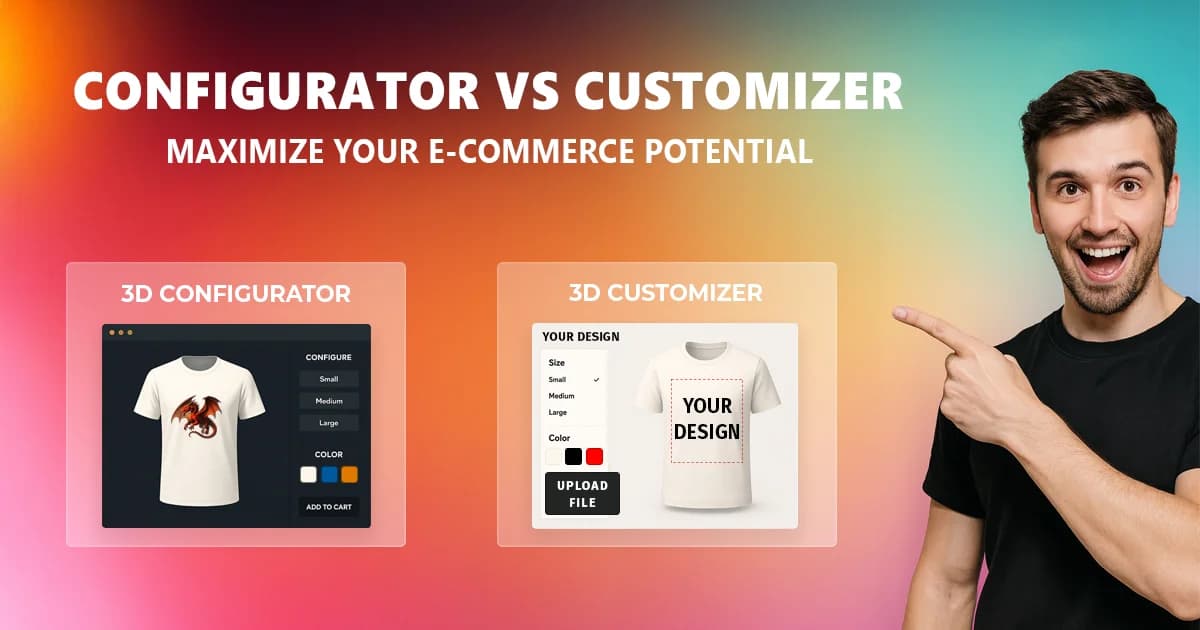
- 3D product configurator — shoppers pick predefined options (color, size, material, print method) with 3D/AR previews and real-time pricing.
- 3D customizer — shoppers can add images, text, patterns, QR codes directly on the product (2D/3D), then you generate mockups and print-ready files for production.
In this guide you’ll see when each tool wins (apparel, mugs, packaging, merch), how to embed securely with an iframe, use a postMessage handshake, create a short-lived Public API session token, and connect cart events to your custom stack. You’ll also get a comparison table and practical examples to pick confidently—without technical jargon.
Want to lift conversion, reduce time-to-market, and cut returns with photorealistic 3D/AR previews? This article is for you. Check whether a 3D product configurator or a 3D customizer for e-commerce is the better fit. At the end you’ll find a quick checklist and links to live demos.
What’s the difference?
Configurator
Shoppers choose predefined variants (e.g., size, color, material, print type). They get 3D/AR previews and real-time pricing. Perfect for made-to-order catalogs and offers where the decision is a set of options.
Example: a classic T-shirt with a store-provided graphic available in 3 colors and 5 sizes.
Customizer
Shoppers create/edit the design on the product: they can add images, text, patterns, QR codes in 2D/3D. You generate mockups and print-ready files ready for production — end-to-end product personalization.
👉 Try it live: Configurator & Customizer Demos
Quick comparison
| Feature | Configurator | Customizer |
|---|---|---|
| Core goal | Choose variants | Create/edit design |
| Typical use cases | MTO catalogs, option sets | POD, merch, personalized gifts |
| Preview | 3D + AR | 2D + 3D + mockup |
| Real-time pricing | Yes (all plans) | Yes |
| Print-ready files | – | Yes (from Personal) |
| White-label (logo/branding) | Business | Business |
| Create your own Customizers | – | Business |
| Integration | iframe + | iframe + Customizer session token + |
Plan notes:
- Real-time pricing — in all plans.
- Print-ready & mockups — from Personal
- White-label — from Business
- Create your own Customizers — Business
- API access with documentation — available in listed plans.
- Website embedding, branded Customizers and server-side embedded storage — Business.
When to choose the Configurator
- You have a closed set of options (color/size/material) and want the fastest path to cart.
- You need a controlled, consistent UX (no risk of “wild” user designs).
- You want 3D/AR previews and real-time pricing without involving your design team.
Examples: furniture (finishes), packaging (material/weight), apparel with predefined graphics or solid colors (sizes/colors).
When to choose the Customizer
- You sell personalized products (POD, merch, gifts) and want to give your customers possibility to design on products they want to order.
- Shoppers should upload logos/photos, add text or QR codes and see it directly on the product (2D/3D).
- You need mockups and print-ready export of purchased products for production purposes (saves time, reduces rework).
Examples: corporate tees, printed mugs, event swag, personalized packaging.
Conversion & UX impact
- Realistic 3D/AR boosts trust — shoppers see true scale and lighting.
- Real-time pricing removes checkout surprises and lowers cart abandonment.
- Shareable design links streamline B2B approvals (e.g., marketing ↔ sales).
- Fewer returns thanks to photorealistic previews and renders.
Custom-stack integration (iframe + postMessage + Public API)
- Prepare API credentials: generate access keys in E-commerce Settings → API Credentials. Keep them server-side only.
- Allow your domain: add the storefront domain in E-commerce Settings → Integration.
- Embed the tool: load the Configurator or Customizer in an
iframeand style it with URL parameters plus container CSS. - Authorize the iframe: handle the secure
postMessagehandshake. The iframe sendsALTER_CHILD_HELLO, your page replies withALTER_PARENT_ACK, then your backend creates a short-lived embed session viaPOST /public-api/v1/embed/session. - Handle cart events: the Configurator can emit
ALTER_CONFIGURATOR_ADD_TO_CARTand return current product data. The Customizer emitsALTER_CUSTOMIZER_ADD_TO_CARTfor new cart lines orALTER_CUSTOMIZER_UPDATE_DESIGNfor existing ones. - Sync Customizer orders: use the Public API to fetch orders, update status, update quantities, or delete abandoned orders. Designs remain editable while status is
shopping_cartoreditable; fulfillment statuses lock customer editing.
Plans & pricing — quick guide
- Free — embed, 3D/AR, real-time pricing, API (project limits).
- Personal — print-ready export and mockups.
- Business — white-label (your logo/colors), private 3D models, your branded 3D Customizer + private template/graphics library.
Shortcut: need white-label + private 3D models → Business. Want to publish your own Customizers for clients → Business.
Decision checklist (2 minutes)
- Does the shopper need to upload their own image/text/QR? → Customizer
- Can your offer be expressed as option lists only? → Configurator
- Do you need print-ready files and mockups? → Customizer
- Should the UI be white-label (your logo/colors)? → Business
- Do you want to create and embed your own Customizers? → Business
What’s next?
- Sign up/Sign, create your first design and change sharing visibility
- Embed the
iframeon a test page and trypostMessagewith your cart. - Pick a plan that unlocks what you need (print-ready, white-label, your own Customizer).
FAQ
Is real-time pricing available in every plan?
Yes - price updates in real time across all plans.
Can I try before I buy?
Yes - Free plan + a 14-day trial on paid plans.
Do you create custom 3D models?
Yes - We can prepare 3d models for you as an additional service. Such models can be exclusive for your account (Business/Enterprise).
Can I embed it on any website or custom stack?
Yes — use an iframe for the UI, postMessage for runtime events, and the Public API from your backend to create secure embed sessions and synchronize Customizer orders. API credentials should stay server-side.